Showing posts with label display. Show all posts

Saturday, 20 February 2021

Bitmoji to Personalise Homophones

Yeah, yeah, we know! It's 2021 and Bitmojis for teachers appear to be everywhere! We quite like the little cartoon version of ourself that we can use to add to our lesson resources, particularly at this time of remote learning. We have seen this you're/your use of Bitmoji several times and have made our own. We've also begun looking at which other homophones and near homophones could be explained using a bit of Bitmoji. 

There are some examples below. 

We've placed our editable PowerPoint original here too if it's useful to anyone

Of course, we'd love to hear ideas for adding to our collection. 

If you want to make these your own, download the editable PowerPoint, the relevant Bitmoji images of yourself and edit the PowerPoint. 


Saturday, 28 November 2020

'How To' Diagrams and Dual Coding

As we've previously written, we are trying to implement some of what we learned when reading about Dual Coding

Here are some of the posters/guides we've made and used in our Year Six classroom as visual guides for our children to use to support/scaffold their learning.

Days in Months of the Year (editable copy)


Long Division (editable copy)


Mixed Number & Improper Fraction Conversions (editable copy)


Co-ordinates (editable copy)


Ascending/Descending (pdf copy)


They've worked for us. They may be useful to you. See links for editable copies. 


Saturday, 21 October 2017

Personalise Your Posters

As teachers and school leaders, we often seek to inspire pupils (and staff) through motivational wall coverings or put up lots of prompts or reminders for lessons.

These may be created in house, or externally. They may be bespoke, or 'off the shelf'.

Here's something that Sparky Teaching recently made for us. Below are snippets of posters made with teacher's names, class/year group names and school name on to add that element of personalisation to a message.

This isn't just any poster. It's a poster for THIS school, class, group... 


Like them? See more at www.sparkyteaching.com.

Thursday, 27 April 2017

Hand Facts

Got a fact you want your class to remember? Try Hand Facts...

By the entrance to your classroom, place a hand and each week, below it, place a fact (we've used it for maths, but there could be one for English too, or the fact could change between subjects). 


As the children enter and leave the room, they place their hand on the fact and say it. This repetition helps them to remember the fact. Fact.

Wednesday, 8 February 2017

The Weather Tree

Another post that is in response to a Tweet we received.


So, here's something we did a fair few years ago...


To start with, the tree is empty and each day a leaf is added. The colour of the leaf is dependant on the temperature outside. On the leaf, other observations and readings about the weather can be added. 


What is creates is a very visual display of the temperature changes across the year. On closer inspection, further information about the day's weather can also be seen.


The leaves were kept in coloured pouches at the bottom that had the key written on them to explain what the colours referred to.

Saturday, 30 January 2016

Our Other Clock

We've shared previously the clock display that we both have on the wall in our classrooms. That clock is designed to share and remind children about some maths facts and vocabulary in an interesting way.


Last week, we realised that we've not written about what's above. Eight years ago (yes that long), Liam got given a new clock for his classroom wall. Upon receiving it, he realised that the plastic front could easily (reasonably easily) removed. So, he removed it and added some reminders about telling the time to the clock face. More information cloud be added. Different information could be added. Maybe different clocks in different places in the school having different information on them? It's a quick, easy (reasonably) and low-cost way of sharing time vocabulary.

Saturday, 3 October 2015

More Estimation Displays

In addition to our recent posts about estimation in the classroom, we've now added some new displays to our year group.


We discovered the idea of using baby wipe lids for displays a long time ago via Twitter. We can't remember the origin, but are happy to add a reference if one is provided. As a new dad, I now have, for the first time, many, many baby wipe lids at my disposal. So, as they've become available, I've used them to set up estimation tasks around our year group and classrooms. Some are about the height and width of doors, others about the length of items and distances around the building too. 
http://www.tesco.com/direct/tesco-loves-baby-ultra-soft-fragrance-free-wipes-x64/718-2497.prd?pageLevel=&skuId=718-2497
 Image credit: Tesco

Got a baby? Know someone with a baby? Save up those baby wipe lids. Measure some items. Make some displays...

Wednesday, 16 September 2015

What? No Date?

A few years ago, I can't remember where it came from (happy to reference if there is a source), we were asked to stop writing the date on the board each day.

Why?

Encourage children to 'know the date each day'.

Improve their independence.

Improve their spelling of days and months. 

Result?

Children use TV, newspapers, tables etc. to find out the date (like adults do).

Children are still able to date work and know what day /date it is.

Rather than just simply copying from the board, those who find spelling of days and months more challenging need to think more about, and remember, these words.

In addition, I save about 30 seconds per day, over 190 days. That's 80 minutes back per year! 80 minutes!

Monday, 11 May 2015

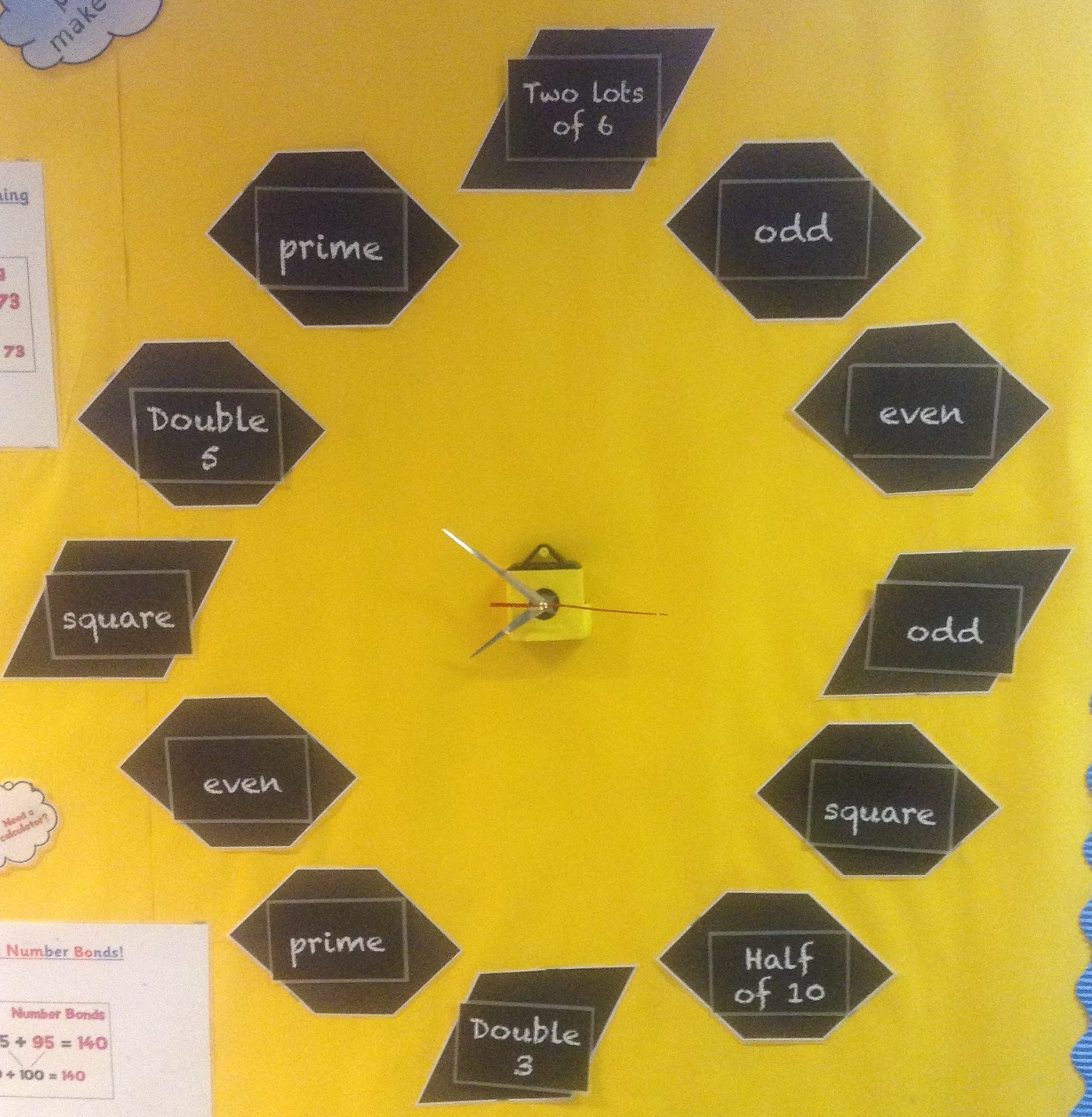
Our Own Maths Clock

During a visit to the Manchester Museum of Science and Industry, we noticed a lovely clock where the digits had been replaced with mathematical formula. A great idea for getting children to think about numbers.


However, it is too small to be of use in classroom for us and, frankly, was probably too hard for the children so we decided to make our own. We used Powerpoint to create the different representations for each digit and created a different set for each term ranging from straight forward calculations to the names of 2D shapes. To make it a clock we bought a clock mechanism for a ridiculously cheap price from the internet (like this one). Hey presto - one mathematical clock for the classroom. If you want to use it, please feel free to use the PDF from our Dropbox.

Embedded image permalink

Tuesday, 21 April 2015

World War II Letters

Our next topic is to focus on a period of historical significance and we are looking at the events in and around Dunkirk during World War II. As well as being inspiring and well resourced, one of the reasons it is so interesting is that it is easier for the children to relate to the people who lived through this period of such importance. Our last history topic was the Mayas and, whilst fascinating because it was something the children knew nothing about, it was hard for children to relate to a life experience that was so far removed from their own.

In order to help our children understand the significance and participation of real people in World War II we have made use of actual letters from participants in in the war. This Canadian letters and images website (www.canadianletters.ca) is an excellent and moving source of information including letters, photos and other documents about real people who took part in the war and is the source of all the resources we have used in our display.

Initially we chose two main people to base our work and display on. Daniel Serrick and Ernest Underwood. Both of these people were Canadians who fought in the war and the letters they wrote or are about them reflect two horrible experiences including Daniel who, unfortunately, did not survive
The display we designed was inspired by a recent visit to the stunning Imperial War Museum North, whose exhibits are all built around the personal experiences of people from conflicts throughout the recent past. Every half an hour or so they also project onto their enormous backdrops a multi-media presentation using memories and pictures. We strongly recommend that if you are in Manchester you pay a visit to this engaging museum.

Our display, to begin with, is based on sharing personal stories of people from the war. We chose a couple of letters from the individuals we had picked to reflect some of the life experiences they were having during the war or from people around them as they process what had happened to them. This allows the children to understand the impact on friends and families as well as the individuals involved. Linked to this, we also chose a photo of them so that children could see that these were real people.

The children were interested to read about them and, even though it is still challenging, were better able to understand some aspects of their lives especially when they talk about the day-to-day aspects of their lives.

A Powerpoint containing the resources for the display can be found in our Dropbox folder here

The next step, again inspired by the visit to the museum, is to add an audio-visual element to the display perhaps using some the augmented reality tools that are available.

Saturday, 8 November 2014

More Display Interactivity

This post is a follow up to our post almost exactly three years ago. Since that post about interactive displays, we added Word of the Week in 2012 and we've now added to it further… 

In October, we wrote about #PadletBombing. That blog post came from an idea inspired by Robin Smith. Robin, you're responsible for this one too…

The Padlet Bombing came about from Robin's class working on different sentence types on a weekly basis and using Padlet as a place to share their work. This got us thinking: 'A sentence per week? What could we do with that?'

So, the interactive display has been added to:


We use the Writing Exciting Sentences book (and associated apps) by Alan Peat to aid our teaching of sentence and punctuation variety. The sentence type for the week and examples used on the display come from the book and app. Children can write their own example of the sentence type and then stick it onto the display. We are using a sentence type that links to the text type being taught that week and ask children to write their example as one that could be used in our writing for that text type. 

In addition, we also came across this yesterday:


You may like a separate section for your interactivity or add it to a Working Wall. 

Thursday, 6 February 2014

Saturday, 4 January 2014

Not all Displays are for Children (Part 2)

The Part 1 of this blog post came almost two years ago now. In December, we finally got around to putting something in place we'd been meaning to 'get around to' for a while. We wanted to place a display on the outside of our classroom for, other classes, parents, grandparents and general passers by to see (and interact with). We posted the picture below to our Twitter account.


The picture and idea was well received so we have decided to write about it in more than 140 characters.

The purpose of the display? Advertise what the class have been doing. Generate website / blog traffic. Show off a bit.

The first thing added was a word cloud. Each member of the class was asked for a sentence to describe their year so far. They only wrote positives. :-)

Next, some QR codes were added. These link to the class website (containing examples of work, recounts of events and photographs) as well as Padlet walls and other examples of children's online work. The QR Code provides a quick link for anyone with a mobile device and should the QR Code not work for any reason, each has a TinyURL below as a back up or alternative.

Our most recent addition is some augmented reality. Using Aurasma, we created a link to a slideshow of photos from a recent school trip. This is probably the 'show off bit'. 

When parents and other family members come into the classroom they look at displays, ask to see children's work and enjoy seeing what's being done. Now they can do it from outside and (if QR Codes are used) realise they can also do this from home.

We've since presented about this as part of a TeachMeet.

Sunday, 8 September 2013

Word of the Week (40 of them)

Over the 2012-2013 academic year we had a Word of the Week displayed in the classroom. The word changed each week and the children were encouraged to make use of it in their writing. Along with this we looked for 'new' words in reading books, finding out their definitions and being able to extend the words used in all writing. 

Our focus was on extending vocabulary and 'using more interesting words'.

The 40 words we used can be found here.

Sunday, 29 January 2012

Start Your Literacy Lesson With a Word Cloud

-->
Firstly, if you’ve not yet heard of or made word clouds before visit one of the websites below to start making them:
We have recently been looking for ways to engage our Key Stage Two learners in improving their understanding of different word types. One way we’ve found to do this has been through the use of word clouds. At the beginning of some literacy lessons we have displayed a word cloud and then set the children the task of listing different types of words that they can find in the word cloud.
The example below contains nouns, adjectives, verbs and adverbs. The children listed words they thought were examples of each. This lead to a discussion about why words were or were not a certain word type and also lead to discussing words like ‘sprout’, ‘stamp’ and ‘smoking’ that can at different times be classified as more than one of these.
This could also be carried out using time connectives, conjunctions, alternatives for said or contractions missing apostrophes that need adding and so on…
The word clouds are easily created by coping a list of words into the website. Below are examples of the four ideas listed previously:


Again, please feel free to add to this post by commenting below.

Sunday, 13 November 2011

Austin The Travelling Bear

While completing my Primary PGCE six years ago, I undertook a placement in a Year Two class. While at that placement I acquired the idea of having a bear that could travel the world and return with stories to be told to the class. So, thank you Mrs. Koletzki (if you're reading this) for the idea! I suppose it's also an extension of the Barnaby Bear Key Stage One resource.

Since completing my training, I have only worked in Key Stage Two, but have had my own class bear (Austin), who spends most days sat in the classroom observing all that goes on. But, every now and again he goes off on adventures. I have a photo album that contains photographs of the places he has visited, a write up of what he did and a post card from each country. In addition to that, I also have newspapers, coins, flags and some other artifacts from each country he has been to.

The children enjoy looking at the pictures of where he has been, seeing the different post cards and, without realising it, developing their knowledge of countries and cultures from around the globe.

This of course all started as a classroom resource, but it's also started to make Austin quite a special bear because of all the places he has now been to: China (twice - including visiting the Great Wall and the Olympics), Finland, Germany, Israel, Jordan, New Zealand, Rwanda, South Korea, Spain (twice), Sweden, Switzerland, Turkey, UAE and Wales. He is, at the time of writing, in the USA. He's had quite a busy six years taking in Europe, Africa, Asia, Oceania and North America.

I must extend my gratitude to friends and family who willingly take him away with them on holiday (often asking for him) and then provide resources from the countries for the classroom.

You can find Austin online here: AustinTheBear


He's certainly better travelled than I am!

Sunday, 6 November 2011

Interactive Classroom Displays

 
In my classroom I have a display board that I refer to as the ‘Interactive Display’. This display is composed of four parts:
  • Country of the Week
  • Number of the Week
  • Park it Here, Let’s find out!
  • This is Good Because…
It is a part of the classroom where the children contribute the content to the outline I have put in place. This is how I have used the four parts:
This part of the display was put in place partly due to me being a geographer, but also as an opportunity to help the children widen and improve their geographic knowledge through their own independent research. Firstly, it highlights the children who already have geographic knowledge as they can add to the display first thing on a Monday morning. It then, throughout the week, provides a discussion about children’s research and where they acquired information. This part of the display is a laminated piece of A3 paper that the children write onto with whiteboard pens. I change the country each week on a Monday morning.
The idea of having a number of the week came from a colleague. Again, this became part of the display partly through my enjoyment of maths, but also to provide an opportunity to look at the children’s knowledge of number. This display is also a laminated A3 piece of paper that the children write onto with whiteboard pens. On this one there are prompts like ‘factors’, ‘half of it is’, ‘double it’ and so on. Although I have shown 100 and 1000 in the two examples below the numbers used range through 45, 88, 125, 366. Again, I change this number each week on a Monday morning.
Park it Here, Let’s find out!
This part of the display is a whole school approach to ensuring questions that are asked during a lesson do not go unanswered. The idea is that when a question is asked that the teacher cannot answer or a question slightly off topic comes to light, it is written onto the Park it Here display. The teacher and the class can then research this question so that it does not go unanswered, but is answered at another appropriate time.
This is Good Because…
The final part of the display is for the pupils in the class to provide each other with some public feedback and praise. When I come across what I perceive to be a ‘good’ piece of work I take a photocopy or photograph of it and then put this on the display. I then write on it why I thought it was good and then the rest of the class can do the same. A little coaching in what to write is required, but the comments are excellent once the children have got the hang of it. When the piece of work is taken down the child gets to keep the copy of their work and the comment slips that were added to it.