Tuesday, 14 July 2015

Road Sign Angles

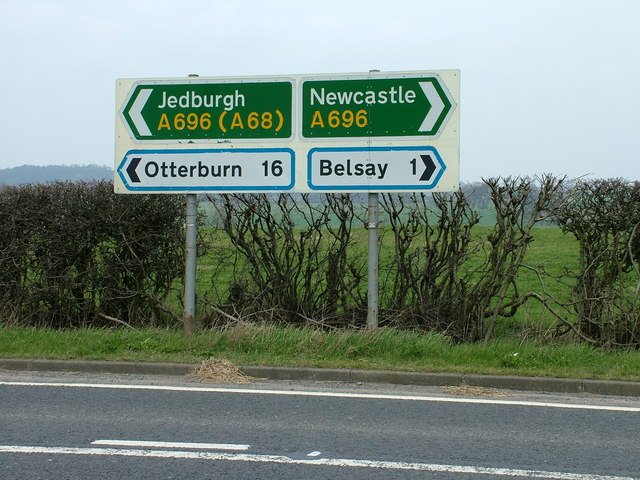
In the past we've used roller coasters as a real-life link and vehicle for studying angles in maths. When driving to work last week, I started to wonder about angles I could see on road signs...

It started with the 300, 200, 100 yard marker boards: "What angle are they at?"


Next, on the the directional signs, "Are the two obtuse angles on the end of the smaller are larger signs the same measure?"
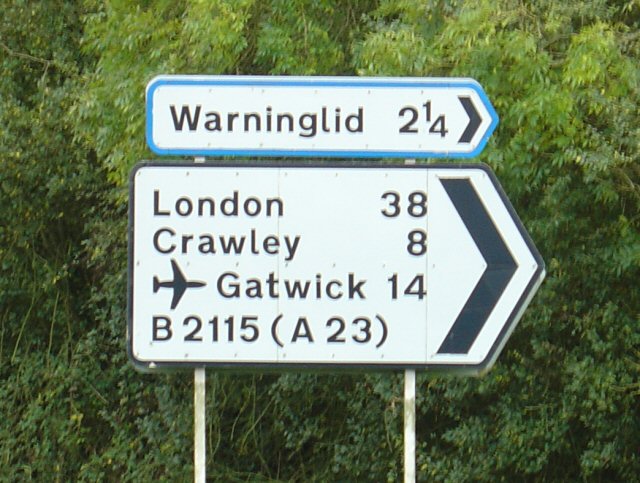
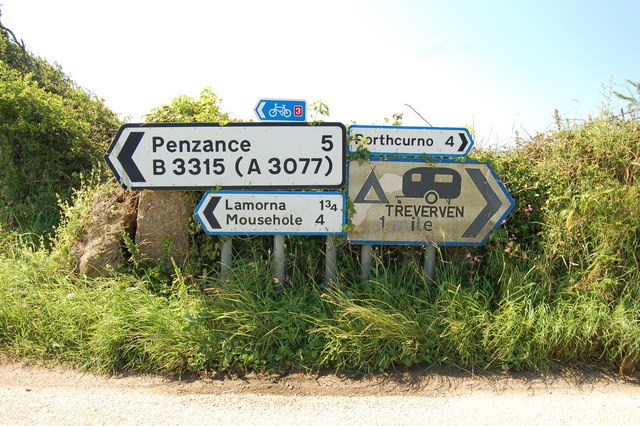


Are there similar or same angles in lots of road signs? 

As of September 2007, 'Traffic Signs'.

Due to the responsible nature of my driving, I chose not to take photographs of the road signs whilst driving. These images came from a Creative Commons image search. However, next time I'm a passenger, I may snap some of my own. 


Friday, 10 July 2015

Minecraft and editing

This is something we tried recently in our Year Six classroom and came away with a qualified success.
The aim was to get the children to work on their editing skills and, in order to engage them, we decided to play the first day of a survival game of Minecraft. For those of you who do not know, survival Minecraft is the version of the game where the character starts with nothing at all, has to make all equipment and get some food and shelter before night falls and zombies, skeletons and other things which go bump arrive to munch on your character.

We took in our Xbox 360 with the game, hooked it up to the IWB and chose a child to be a player. We were very clear that only one person would get to play the game during the lesson in order to avoid complaints (only partially successful) and randomly chose someone from the class to take control.
Whilst the child played the game, the rest of the children were writing the story of what was happening on the screen. We paused the game at regular intervals in order to discuss description, thoughts and feelings and what might happen next.
The game carried on until, luckily, the player discovered a village. We were then able to hide in the village whilst surrounded by a 'horde' of moaning, ravenous (the class came up with that) zombies. As dawn broke, I ended the game and we looked at the writing.
What the children had for the most part was a very clear first draft. As the writing had taken place at pace, there were lots of errors and, even when there was description, chunks of text that clearly could be improved.
The children then restarted the writing from the beginning on a new page, improving it as they wrote and adding much more depth and detail.
What we ended up with was two interesting pieces of writing. The first having a definite plot, characters and even the build up of tension. The second, which had been redrafted, was clearly improved with a much wider range of vocabulary.
However, the lesson could be improved in a number of ways. Firstly, in both pieces of writing there was a tendency towards shorter sentences. Secondly, there was no dialogue, so in future, when stopping the game, we would talk about what might be said. Finally, we would try to find someone who was not so good at playing the game so that there was a bit more suspense during the 'day'.

Friday, 19 June 2015

Your Own Bank of GPS (SPaG) Resources

With a bit of inspiration from Stephen Lockyer, we've set off on a new venture. After reading this post by him, we wanted to find a website, Pinterest board or similar that had photographs with grammar errors on that could be used with Key Stage Two children. The reason we wanted a website with 'friendly' images on was so that it could be a go-to place either while planning or if something came up in a lesson. Everything there could be trusted to be classroom material. A web image search is often great, but can involve a lot of scrolling and sometimes things that shouldn't be shown in a classroom.

Because we often find it difficult to switch off from 'teacher mode', while out-and-about, we sometimes spot that companies have made errors on their signs (or intentionally made broken grammar rules as part of their branding). We have started to take photos of these and store them on Dropbox so that we (and others) can make use of them.

Here's one from a hospital toilet:

And one Tweeted to the council responsible for it:
After discussing the errors or branding, a company or person could be written to by a class or pupil to explain what's wrong. And, as the photo was taken by the teacher, we're able to explain its location and context. It may even be in a location familiar to the children.

Our images can be found here. Please feel free to use them.

Saturday, 6 June 2015

20 Apps for a Primary School iPad Device

We've written many posts about apps. Mostly, lists of apps we've come across, but also some of the possible uses for them. Yesterday, Liam presented in London about the use of iPad devices in the classroom. As part of that presentation, he gave his top twenty apps that he uses to support learning in his classroom. 


Of course this list is open to discussion, it doesn't explain uses for them and there's an app for just about everything (or at least it feels that way). If you'd like to take a look at the slides used in the presentation, they can be found here

In response to our post:
 

Wednesday, 27 May 2015

One App - Whole Class

A couple of weeks ago, I wanted to do an activity with my class at the end of an English lesson about word classes. I knew I had Shake-A-Phrase installed on my iPad device, but, at the time, it wasn't installed on the school's iPad devices. I decided to give something a go...
I opened the app up on my device and used AirServer to allow the whole class to see what was on the iPad's screen. I then started the Quiz element of Shake-A-Phrase and when each sentence came up the class called out what they thought the answer was and I clicked what they suggested. As a class, we discussed, enjoyed and learned. 

I've since given this a go with other apps too and in different ways:

Math Duel: Split the class in half. Each team had a person sat at the iPad device and the team called out answers for the person at the iPad to enter.

SpellFix and Word-Juice by Alan Peat Ltd.: Projected the puzzle for all to see and passed around the device with suggestions coming from the class.
At the time of writing, I tried to get Sentopiary to work, but it will not project through AirServer. UPDATE: 03/06/15 For Sentopiary to work through AirServer, the iPad needs to be projected using AirServer and then the Sentopiary app opened. Opening the app and then projecting with AirServer will not work.

Quento: While the class were using the same app, we projected one for the class to do together. 

Also, display two screens side by side - competition...

Even tough we have class sets of iPad devices, this gives a different slant on the activities. If you try it, let us know. We'd love to know any other apps that work well.

Thursday, 21 May 2015

Live Blog with Padlet

As part of our computing lessons this year, we wanted to be able to live blog some events in our classrooms. We currently do not have class blogs and were wondering how our goal of Live Blogging could be met. 

We decided Padlet would be a good platform, that the children are familiar with, to give Live Blogging a go. 


So, we set up a Padlet page. We stuck a large QR Code linking to the page on the wall of the classroom. First thing in the morning, we handed the first child in the register an iPad device and gave them an instruction of, "Scan that code and in the next twenty minutes, write about what you do. After that, pass on the iPad device to the next person in the register."

It worked very well. Using one Padlet wall allowed the day's event to all be in one place. The children's familiarity with QR Codes, iPad devices and Padlet allowed them to blog unaided. The results were good and we even got some comments from those who came across our Live Blog. The posts to the page were moderated by the class teacher.

Here's Year Five's day from 18/05/15:


One class, who came across our Live Blog, also chose to carry out their own a few days later and that can be seen here

If you give it a go, we'd love to see the outcome. 

Sunday, 17 May 2015

'We Make Use of...' Mathletics


Image credit: www.3plearning.com


We've been using Mathletics for about six years now. Initially, it provided a quick and easy way to direct children towards online activities.

However, it's much more powerful than that and is being improved all the time. There are no doubt parts of the site we are yet to find or utilise fully. The 'Live Maths', which is no doubt the area that children are drawn to initially, is ideal to get children to practise mental arithmetic as it involves competing against anonymous peers - sometimes in class, but often outside of the classroom. Children are engaged by this and enjoy competing against other children from around the world. A lesser known aspect of this, is the ability to change the level at which children are working to make the mental questions harder.

For home learning, we're able to set tasks that link to what has been taught in class and that children must complete before they can take part in any other part of Mathletics. Afterwards, the score the child achieved is logged and can be viewed by the teacher. Some teaching can then take place and the children can even retake the activity to see if their understanding of it has improved. There is a wide range of topic areas and children have the ability to self-differentiate by choosing or harder tasks from within the topic area.

We are increasingly making use of this website to provide personalised learning tasks in the home. As we adapt to assessment without levels and integrate the mastery curriculum, many schools are assessing children based on statements of mathematical skill. Mathletics provides an excellent tool for developing curricula based on these statements through the setting up of personalised programmes. Teachers can create a programme made up of the different statements and drag relevant activities into it making a personalised programme, which children can work on independently at home. The great thing is that  many, if not all, of the activities come with tutorial videos to help parents and children. We had two set programmes used in Year Six at a working towards Level 4 and working towards Level 5 and, by assessing which areas children needed most practise, we were able to target home learning at areas that the children needed most. The setting up of the programmes take time, but if several people are working on them this is not only simple, it is also a tool which can be used across the school and for some time to come.

Times Tables Toons are a range of music videos which encourage children to chant their multiplication facts. They are a little cheesy, but certainly catchy enough even if they are discrete from associated division facts. 

There are various different certificates that can be achieved by children working with Mathletics. We hand these out in class (Bronze), in year group assemblies (Silver) and whole school assemblies (Gold). This recognises the achievements of those receiving the award and encourages others to also work towards the certificates.


Note: We have written this post as a result of using this website in our classrooms. We have not been asked or paid to write. We are often approached to write posts, but have and will continue to only write about what we have done in our classrooms. We're two full-time class teachers choosing to blog about our experiences.